Reviewed · TOURS IN SEOUL
South Korea eSIM (3-30 days. Up to 45GB)
Landing in Seoul with working data makes the first hour far easier. This digital eSIM arrives by email, so you can set it up before departure and use maps, messages, translation tools, and transport information without visiting an airport shop.
I like the low starting price of $5 per person, and I like the choice of plans from 3 to 30 days. The main catch is compatibility: your phone must support eSIM, and high-speed data is limited to the amount in your chosen plan before service drops to 3G.
Key points
- QR-code delivery by email: You receive the eSIM remotely, with no pickup, meeting point, or physical card.
- Plans for 3 to 30 days: Choose a duration that matches a short Seoul break or a longer South Korea trip.
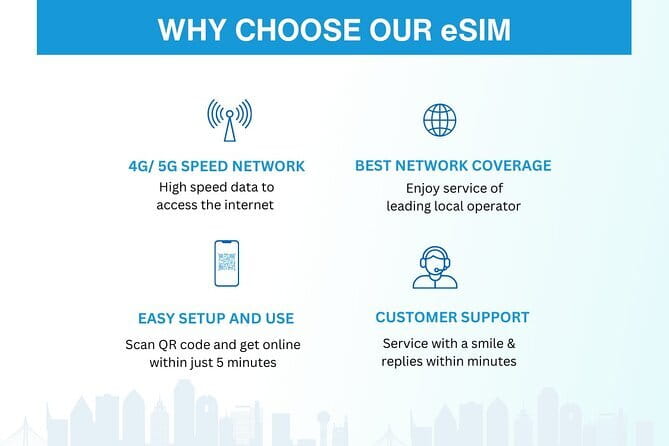
- Up to 45GB of high-speed data: 4G and 5G are available where supported, depending on your device and local coverage.
- Unlimited 3G after the cap: Your connection should continue at a slower speed once the high-speed allowance is used.
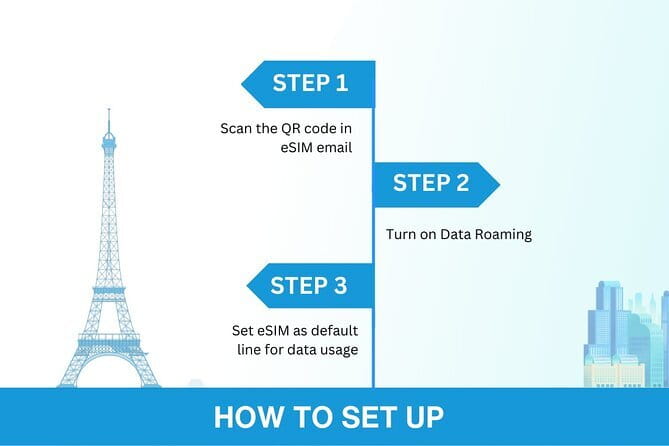
- Simple arrival setup: Turn on data roaming after landing, and restart your phone if the profile does not fully activate.
- Email-based help: Remote customer service is available if you need assistance with activation or use.
Why a South Korea eSIM helps from the moment you land
A physical SIM often means finding a counter, waiting in line, checking passport details, and figuring out an activation process while tired. This eSIM removes that airport errand. You receive the QR code by email and can prepare it before leaving home.
That matters in Seoul. You may need directions from the airport, a translation app, a taxi app, or a message to your hotel before you have time to get settled. With the profile ready, you can start using mobile data soon after arrival.
The product is data-focused. The information provided does not promise a Korean phone number, voice calls, or text messages, so I would treat this as an internet connection rather than a replacement for every phone function. Messaging apps and internet calling may work through data, but those specific services are not included as stated features.
The experience has no physical tour route. There is no guide, vehicle, pickup, or meetup. You buy the plan, receive it digitally, install it on a compatible phone, and use it during the selected number of days.
Other trips people book in Seoul:
- Best DMZ Tour Korea from Seoul (Red Suspension Bridge Optional)
★ 5.0 · 41,422 reviews - DMZ Tour: 3rd Tunnel, Option(Suspension Bridge, Boat) from Seoul
★ 5.0 · 21,373 reviews - DMZ tour south Korea from Seoul (NK experience hall, defector)
★ 5.0 · 20,599 reviews
Choosing between 3 and 30 days of service
The plan range is useful because South Korea trips vary widely. A quick Seoul stop may need only three days, while a longer visit can use a plan lasting up to 30 days. The right choice depends on the length of your stay and how much you expect to use your phone away from Wi-Fi.
The product title lists options reaching 45GB, but the exact data allowance depends on the option you choose. Check the selected package before paying. A heavy user who streams video, makes video calls, uploads photos, or uses cloud services will use data much faster than someone who mainly checks maps and sends messages.
For ordinary trip planning, navigation, translation, and messaging, a modest allowance may be enough. Streaming and video calls can use a large amount quickly. One of the supplied comments describes fast service for video calls and streaming, but that does not remove the stated high-speed limit.
The useful safety net is the continued 3G access. Once your high-speed allowance ends, the connection changes to 3G rather than stopping completely. That is valuable for basic maps, text messages, email, and simple searches, though slower service can make photos, video, and large pages frustrating.
Installing the QR code before your flight
You receive the eSIM by email after booking. Since this is a digital product, make sure you can open the message and access the QR code before you leave. Save the email where you can find it easily.
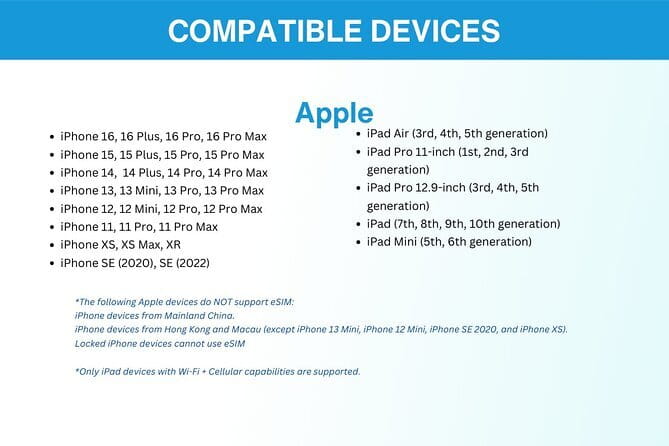
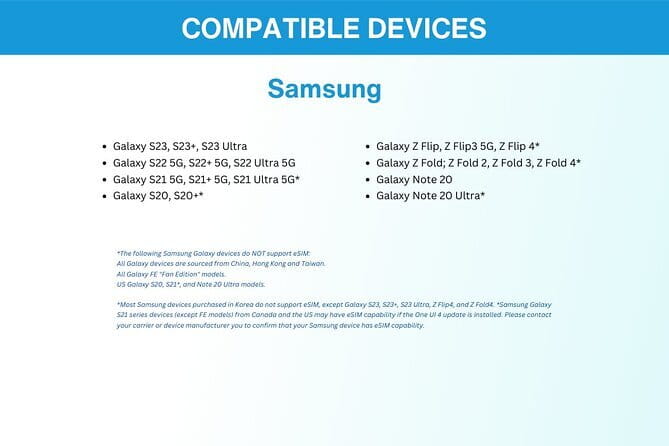
Your phone must support eSIM. The supplied examples include iPhone XS and later, Pixel 3 and later, and Samsung S20, S21, and Fold models. These examples are not a complete compatibility list, so check your exact phone model before purchase if you are unsure.
The general setup process is straightforward:
- Open the email containing the QR code.
- Add the eSIM profile through your phone settings.
- Keep your regular SIM available if you want to use it for your normal number.
- Select the travel eSIM for mobile data when you arrive.
- Turn on data roaming as instructed.
- Restart the device if the connection does not begin fully.
The instruction about restarting is worth noting. One user found that the eSIM needed a phone restart to finish activating. This is a small step, but it can save time when you are standing in an arrivals hall wondering why the bars have not appeared.
You should install carefully rather than delete the profile casually. The supplied information does not explain how many times a QR code can be reused or how replacement profiles are handled. If you have any doubt, contact the provider before changing settings.
Using 4G and 5G around South Korea
The service provides 4G and 5G where available. Actual speed depends on local network conditions, your phone, and the network connection at that moment. The eSIM is designed to connect to a local network automatically, and one user reported strong service from Seoul to Jeju Island.
That report is encouraging, especially if your plans go beyond the capital. Still, no mobile service can promise identical performance everywhere. The supplied information does not give a detailed coverage map or name a particular Korean carrier. I would view automatic local-network access as convenient, not as a guarantee of full-speed service in every building or remote area.
The eSIM is especially useful for practical tasks. You can check directions, search opening information, translate signs, message your accommodation, and keep family updated. A reliable data connection can also help you recover when a subway exit, street name, or address is confusing.
Your phone may display different network information from what you expect. That alone does not mean the eSIM has failed. Check that the travel profile is active, mobile data is assigned to it, and data roaming is switched on.
Same base, a different kind of day out:
- Seoul: DMZ Tour with Optional Suspension Bridge
★ 4.8 · 5,277 reviews - Signature DMZ Tour: Exclusive Defector Talk & Suspension Bridge
★ 5.0 · 4,459 reviews - Thrilling Korean DMZ 3rd Tunnel Tour from Seoul + Red Bridge Rush
★ 5.0 · 3,097 reviews - DMZ Past and Present: Korean Demilitarized Zone Tour from Seoul
★ 5.0 · 2,481 reviews
What the 45GB allowance really means

The headline figure can sound generous, but the important detail is the distinction between high-speed data and continued 3G data. Your selected plan includes a stated amount of faster data, up to 45GB depending on the package. Once that allowance is used, the service switches to 3G.
For many people, 45GB is plenty for a month of maps, social media, photos, music, and some video. For a short trip, even a smaller plan may work well if you use hotel Wi-Fi for large downloads and streaming.
I would take a few sensible steps to protect the allowance:
- Turn off automatic app updates over mobile data.
- Avoid backing up a large photo library while using the eSIM.
- Download anything important before leaving Wi-Fi.
- Watch video at a lower quality if you are using mobile data heavily.
- Check your phone’s data-usage screen during the trip.
The continued 3G connection is more useful for staying reachable than for entertainment. Basic web pages may load slowly, and video calls may become difficult after the high-speed cap. The product therefore suits someone who wants dependable access to essential tools, but a constant high-speed user should choose the largest suitable package and monitor consumption.
The value of paying about $5 instead of buying at the airport
At a starting price of $5 per person, this is a low-cost way to handle one of the least exciting parts of a trip. The real value is not only the data. It is the time saved and the reduced need to explain your needs at an airport counter.
The price varies by duration and data amount, so compare the exact option on the booking page. A three-day plan and a 30-day plan will not serve the same purpose. The most expensive option may not be the best value if you spend most of your time on Wi-Fi.
The price also buys advance preparation. You can set up the service before your flight rather than making a purchase while jet-lagged. That is helpful for solo visitors, families, and anyone who wants directions ready as soon as they arrive.
There are limits to the value. You must have a compatible phone, and the product is not a physical SIM that can be moved casually between devices. If your handset does not support eSIM, the $5 price is irrelevant. Check first.
One detail deserves extra caution: the supplied information says the data plan covers all Canadian provinces, even though the product is for South Korea. That appears inconsistent with the destination. I would ask the provider to confirm South Korea coverage before purchasing, especially if that wording appears in your booking details.
Support by email, with no counter to visit
Remote customer service is available by email. That is useful if your QR code does not arrive, the setup instructions are unclear, or your data connection does not begin after installation.
The tradeoff is that support is not described as in-person or 24-hour help. There is no physical desk in Seoul and no pickup location. If you need assistance, you should contact the provider remotely.
I would install the profile before departure when possible. That gives you time to solve compatibility or setup problems at home, where you have Wi-Fi and access to your regular phone service. Waiting until arrival leaves less room for correction.
The basic activation tip is simple: once you land, turn on data roaming for the eSIM. If the profile still does not connect, restart the phone. These steps are specifically useful because activation can sometimes look incomplete until the device reconnects.
Who should choose this eSIM
This product suits you if you want a low-cost, data-only connection without buying a physical SIM in South Korea. It is a good match for a short Seoul visit, a multiweek trip, or an itinerary that includes Seoul and Jeju Island.
It also fits people who value preparation. Receiving the QR code before departure means you can deal with setup in a calm place instead of an airport. The plan is practical for maps, messages, translation, trip planning, and keeping in touch with family.
You may want another option if your phone lacks eSIM support, if you need a Korean number for calls or texts, or if you want guaranteed high-speed data after using the package allowance. The available information does not promise those features.
The overall rating supplied for the experience is 5 from five reviews, with praise focused on reliable coverage, simple service, and fast internet. Those comments support the product’s main purpose, but the small number of ratings means I would still check the exact data amount, coverage wording, and device requirements before paying.
Should you book the South Korea eSIM?
Book it if you have a compatible phone, want mobile data ready before landing, and are comfortable managing a high-speed allowance. The QR delivery, 3 to 30-day choices, automatic local-network connection, and continued 3G access make it a practical travel tool at a low starting price.
Pause before booking if your phone compatibility is uncertain or if the Canadian coverage wording remains unexplained. Email the provider first. For most visitors who need maps and messages rather than a full Korean phone service, this eSIM is a sensible, inexpensive choice.
Free cancellation is available if you cancel at least 24 hours before the local start time. Changes or cancellations made inside that window are not accepted for a refund.
FAQ
What is included with the South Korea eSIM?
You receive an eSIM with a mobile data package for the selected duration, mobile data access during that period, email delivery, and remote customer service by email.
How long can I use the eSIM?
You can choose a plan lasting from 3 to 30 days.
How much does the eSIM cost?
The listed price starts at $5 per person. The final price may depend on the duration and data option selected.
How do I receive the eSIM?
The eSIM is delivered by email after booking. You receive a QR code that you can scan to add the eSIM profile to your phone.
Does my phone need special compatibility?
Yes. Your phone must support eSIM. Examples provided include iPhone XS and later, Pixel 3 and later, and Samsung S20, S21, and Fold models.
Does the eSIM provide 4G or 5G?
It provides 4G and 5G where available. Service also depends on your phone and local network conditions.
What happens after I use the high-speed data allowance?
High-speed data is capped at the amount included in your selected plan. After that, the connection switches to 3G data speed.
Do I need to do anything after landing?
You need to turn on data roaming for the eSIM. Restarting your device may also be necessary to complete activation.
Can I cancel for a refund?
Yes. You can cancel for a full refund up to 24 hours before the experience start time. Cancellations made less than 24 hours before the start time are not refunded.
Just added in Seoul
- Your Personal Seoul Photographer!★ 4.1 · 15 reviews
- You’re Invited to Our Home in Seoul: The Only Cooking Class!★ 5.0 · 8 reviews
- From Seoul: Yongpyong Ski Day Tour with Transportation★ 4.9 · 40 reviews
- Seoul: Korean & English Language Exchange Global Party★ 5.0 · 28 reviews
- From Seoul: Hwacheon Ice Fishing and Lighting Festival Tour★ 4.5 · 4 reviews
- Seoul: Gangneung BTS K-Pop & K-Drama Filming Locations Tour★ 4.6 · 14 reviews
- Unique Native Experience : Han River Picnic, Board game, BBQ★ 5.0 · 3 reviews
- K-Pop Making Class with a Producer!★ 5.0 · 3 reviews
Tours in Seoul, compared.
Best DMZ Tour Korea from Seoul (Red Suspension Bridge Optional)
Read our review →
DMZ Tour: 3rd Tunnel, Option(Suspension Bridge, Boat) from Seoul
Read our review →
DMZ tour south Korea from Seoul (NK experience hall, defector)
Read our review →

Signature DMZ Tour: Exclusive Defector Talk & Suspension Bridge
Read our review →
Thrilling Korean DMZ 3rd Tunnel Tour from Seoul + Red Bridge Rush
Read our review →
DMZ Past and Present: Korean Demilitarized Zone Tour from Seoul
Read our review →